Tefal Mini Far Infrared Induction Heating 1L Rice Cooker RK887
Rice cooker is a kitchen appliance that almost all household have. Compact and multi functions makes it a greater choice.
Recently. I tried Tefal Mini Far Infrared Induction Heating 1L Rice Cooker RK887. This mini rice cooker is easy to use and cooked perfect delicious rice.
Check out my experience below.
About Tefal Mini Rice Cooker RK887
Tefal Mini Far Infrared Induction Heating 1L Rice Cooker RK887 is a compact rice cooker with the following features or benefits:
easy to clean nonstick pot and removable inner lid.
small size big capacity (1/5 cups of rice).
voice navigation.
12 hours keep warm.
timer and 24 hours preset function.
came with accessories (measuring cup, rice spatula, stainless steel steam basket, soup spoon).
950W power.
My Review
Rice cooker is a must have kitchen appliance for me. Nowadays, rice cooker can cook more than just rice. Therefore, compact and multi functions is my buying criteria.
Recently, I tried Tefal Mini Far Infrared Induction Heating 1L Rice Cooker RK887.
The rice cooker came packed nicely in the usual box.
Came in a box.
Came nicely packed.
It came with accessories such as measuring cup, rice spatula, stainless steel steam basket and soup spoon. It came with user manual and power adapter as well.
Came with accessories.
Measuring cup, steam basket and spherical pot.
The rice cooker came compact and easy to navigate from the top digital panel.
Compact rice cooker.
Easy to navigate from the top digital panel.
How the inner cooker look like.
The inner lid and steam valve at the top can be removed and clean easily.
The inner lid can be removed.
The steam valve can be removed and clean.
Exclusive Far Infrared cooking technology.
I love the voice feature the most. It is more interactive and allows me to know the cooking condition of my rice.
I have used this rice cooker to cook white rice, multigrain rice and also porridge. It is so easy to cook and rice turns out nice and delicious.
Cook white rice, multigrain rice and also porridge.
White rice cooked is fluffy, soft and fragrance. It is cooked perfectly as what I wanted.
Cooking white rice.
Multigrain rice cooked is soft and slightly sticky.
Cooking multigrain rice.
The porridge I use to cook with is thick and creamy.
Cooking porridge.
Just one con that I found. I may accidentally press the touch screen cancel button when cooking half way to open and add extra ingredients.
Check out a short video of the rice cooker.
Overall, this rice cooker is easy to use and did a great job cooking nice and delicious rice.
Where to buy it?
Tefal Mini Far Infrared Induction Heating 1L Rice Cooker RK887 can be purchase from Tefal offical Website, major department store and also from online store such as Shopee and Lazada from a retail price of S$299.
Look out for sale price for the product.
Disclaimer:
Products were provided for personal review purposes only. All reviews
are 100% honest and based on my personal experience. No monetary
compensation of any kind was given or received for this review.
Are you currently keeping a lookout for an affordable, quality and reliable tablet with sleek and slim design? Then look no further. The tablet I am introducing you below is just what you are looking for.
Checkout LUMOS Tablet Pro. This is definitely a wallet friendly top quality tablet that allows you to fulfill both your productivity and entertainment needs.
Let me walk you through what sets LUMOS Tablet Pro apart.
About LUMOS Tablet Pro
LUMOS Projector is a home grown local Singaporean brand that specialized in home projectors. They strives to bring the best quality home cinema projector that is affordable for everyone.
Features and benefits of LUMOS Tablet Pro:
128GB Storage
18GB RAM
1920x1200p Full HD Resolution
Dual 4G SIM Slots
IPS Display - crystal clear, vibrant and vivid color
10.1 inch large screen
Up to 8 Hours Battery Life
Sleek and Slim Design
5 MP + 8 MP Camera
Bluetooth 5.0
Mirror Casting
Split Screen Mode
Wifi 6
3.5mm headphone jack
Convert to mini laptop (bundle set)
Type C Charging Cable
Android 15
Affordable, best value tablet.
Trusted local brand
1 year local warranty
Bundle Set comes with bluetooth keyboard, mouse, stylus pen and case cover.
Looking for tablet? Too much choices out there? Let me lessen your trouble with the introduction of LUMOS Tablet Pro.
This is not the first tablet I had tried from LUMOS. I had previously tried their first viral LUMOS Tablet that greatly exceeded my expectation. Check them out here.
Recently, I was introduced to their new LUMOS Tablet Pro. This is an upgraded version of their previous tablet.
LUMOS Tablet Pro (bundle) came packed in their usual simple white container.
Came pack nicely.
Bundle set came with bluetooth keyboard, mouse, stylus pen and case cover.
What is inside the box.
Checkout the unboxing video below.
Trusted Local Brand
When buying anything, it sets our mind at ease when we know that it comes from a trusted brand.
LUMOS is a local trusted brand that received many satisfied 5-star user reviews over 3 years.
Local trusted brand.
5-star user reviews.
Sleek and Slim Design
This tablet pro came in a 10.1 inch large screen but looks slim. It is actually as thin as a 122 pages book.
As thin as a book.
The sleek design of the tablet makes it look really premium.
Front of the tablet.
Back of the tablet.
Side view of the tablet.
I put this tablet to the weighing scale and it actually weighs 440.8g only. It is really light for me to carry around.
Weighs 440.8g only.
The screen also came protected with basic screen protector.
Came protected with basic screen protector.
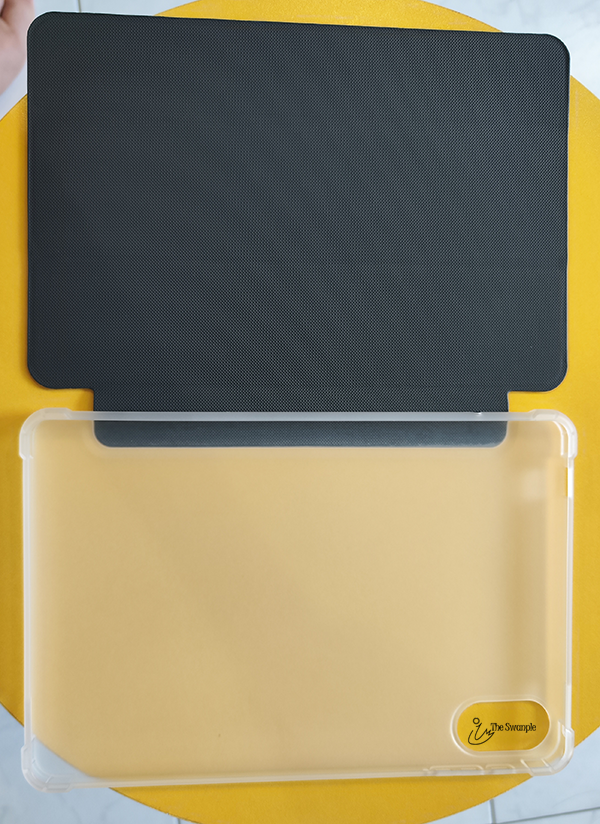
The case cover given is able to provide basic protection for my tablet. It would be an added point if the case cover comes in a matching sleek design that looks as premium as the tablet.
Dual 4G Sim Slot
One of the new feature of this tablet pro is that it came with a dual 4G sim card slot. This is very helpful as it keeps me connected always wherever I am. No worries of connection or speed.
Dual 4G sim slot.
Come with pin to pull out the slot.
My tablet is now always connected.
Battery Life
Battery life is always one of the most headache feature for gadget owner.
But I am really pleased with the battery life of LUMOS tablet pro.
Full charged tablet can last me 8 hrs plus of really intense usage on applications such as VN video editor and lightroom mobile photo editor, watching video on YouTube, surfing social media, doing blog post editing, etc.
8 hrs plus of battery usage.
This is even slightly more than the official stated hours.
Also, 15% of battery life to full charged battery needs around an estimate of 3 hours.
Totally no headache at all!
Full HD Resolution
This tablet came in full HD resolution. This is important as the screen looks clear, sharp with vivid colors.
Home Screen.
This makes productivity and entertainment tasks more enjoyable and productive.
Full HD makes it great for entertainment.
Checkout the clear and vivid colors while playing of YouTube video on the tablet. (Captured using tablet screen record)
The sound quality also came paired perfectly. It is clear and not flat.
Mirror Casting and Mini Laptop
The mirror casting feature makes it easier for me to cast my tablet to a bigger screen like TV or projector. Great for presentation as well as entertainment.
Mirror Casting.
My bundle set came with accessories like keyboard, mouse and stylus, which makes it possible for my tablet to turn into a mini laptop.
Tablet turn into a mini laptop.
The accessories are easy to connect and use. Responsiveness is smooth with no lag.
While the keyboard's compact size is perfect for portability,it takes a little getting used to compared to a standard size keyboard.
Also, finger scrolling is still my first choice as compare to using a stylus. 😁
Accessories for mini laptop.
I have been using it to complete around 60% of this blog post. Very helpful for my personal work as it can be turn into a mini laptop, offering the flexibility to
complete my work more efficiently during spare time, no matter the location.
Split Screen Mode
I am one person who likes to multitask my screen. I always love to watch my video at the same time surf net or write up my blog post.
Split screen mode.
It is great that I am able to continue my habit using this tablet.
RAM and Storage
This tablet is upgraded with 18GB of RAM and 128GB of storage.
I am extremely happy to see the upgrade. 18GB of RAM makes scrolling and accessing app super smooth with no lag at all.
I am able to edit video smoothly without any lag and hiccup.
Smooth video editing.
I am even able to edit photo using lightroom mobile with an insane resolution of 12000 x 8000 pixels without any lag.
Photo editing.
I do not have to worry about storage space too as the tablet comes with 128GB of storage space. This is enough for all my photos, videos and apps.
The video below is a summary of the features mentioned above including usage of intensive apps that are able to leverage on the huge RAM size to ensure smooth usage.
Overall, this upgraded tablet pro from LUMOS once again wow me with the super smooth and lag free usage with long battery life. The ability for intensive apps usage is a bonus for this quality tablet that is so wallet friendly. It is definitely a premium tablet to consider and get. Go grab yours to experience the wow that I just experience.
Where to buy it?
LUMOS Tablet Pro can be purchase from LUMOS Projector Website at a sale price of S$328 (bundle) and S$249 (tablet only).
All tablet comes with 1 year of local warranty.
Shipping is available currently only in Singapore.
Disclaimer:This post is written in collaboration with LUMOS Projector. All reviews are 100% honest and based on my personal experience. No monetary compensation of any kind was given or received for this review.
Digital gadget is something that everyone cannot live without in modern days. Convenience, affordability and quality are the top criteria when choosing our digital gadget. Tablet is a great digital gadget to consider.
Recently, I was introduced to LUMOS Tablet. This new tablet from LUMOS not only fulfilled my top 3 criteria, the accessories that comes with it allowed me to turn it into a mini laptop.
Come check out my experience below and fall in love with this tablet together with me.
About LUMOS Tablet
LUMOS Projector is a home grown local Singaporean brand that specialized in
home projectors. They strives to bring the best quality home cinema
projector that is affordable for everyone.
Features and benefit of LUMOS Tablet:
10.1 inch large screen size
4K Resolution (1920 x 800p)
8GB RAM
IPS Display - super clear, vibrant and vivid color
64GB Storage
2 MP + 8MP Camera
6000mAh battery, up to 8 hours runtime - long lasting
Micro SD card slot available
Android 14
Bluetooth 5.0
Wifi 6
3.5mm headphone jack
Comes with WPS office App.
Comes with build-in screenshare, mirror casting technology.
Convert to mini laptop (bundle set)
Type C charging cable.
Affordable, best value tablet.
1 year local warranty
Bundle Set comes with bluetooth keyboard, mouse, stylus pen and case cover.
We cannot live without digital gadgets in our everyday life. There are so many out there and it is important that we choose it the smart way.
Tablet is one great choice when choosing our digital gadget as it affordable and versatile.
Recently, I was introduced to the new LUMOS Tablet. I don't usually get so excited over digital gadget but I was really excited when I get my hands on this extremely affordable and top quality LUMOS Tablet.
The tablet came in a nice rectangle box.
Came in a rectangle box.
Nicely packed.
The one I have came bundle with accessories (Bluetooth keyboard, mouse, stylus pen and case cover).
Came with accessories: Bluetooth keyboard, mouse, stylus pen and case cover.
The case cover came with semi transparent back and the case doesn't feels flimsy and tablet can easily be remove and put onto the silicone casing.
Comes with case cover.
Case doesn't feels flimsy.
Easy to put in.
Tablet with case cover.
Tablet Features
The tablet front is black and back is gray in color.
Front is black.
Back is gray.
The tablet is thin and weight about 488g. A bit of weight there but not that heavy to carry around. 10.1 inch screen size is just nice for me.
The tablet is thin.
It came with basic screen protector too.
Besides the usual power button, volume button and type C jack, this tablet came with 3.5mm headphone jack and micro SD card slot. Now I can use my favorite headphone without using an adapter. I can also easily copy my video and documents into my micro SD card and plug into the tablet.
Power and volume button.
Speaker and 3.5mm headphone jack.
Micro SD card slot and type C jack.
It is also easy to slot my micro SD card into the slot. No need for pin. I just need to gently pull open the rubber cover and push the micro SD card in.
Easy to slot my micro SD card into the slot.
Battery Life
Tablet came with loaded battery when I first open it. Mine came loaded with 83% of battery.
After fully charge, without doing anything for the whole day, battery is reduce to 96%.
Showing battery life.
The 6000mAh battery is pretty long lasting. 3 to 4 long hours of heavy usage on watching YouTube and videos uses around 30% of the battery only.
The battery last even longer if I turn on airplane mode with WiFi without any sim card.
Also, the tablet does not heat up even after using for long hours.
It takes around 3 hours to fully charge the tablet with 20% of battery life left.
Setup
This LUMOS tablet is pretty easy to setup. There are step by step clear instructions to follow during setup.
There are step by step clear instructions to follow during setup.
Settings screen on the tablet.
Display And Applications
I like it that the app drawer came clean without any bloatware. It only came with essential applications.
App drawer came clean without any bloatware.
Recent app drawer.
The display screen is clear and sharp with vivid colors. Accessing and scrolling is smooth. Watching videos, surfing social media and using apps is a breeze.
Tablet home screen.
Surfing net.
Using apps is a breeze.
This tablet is also kids friendly with apps catered for kids. It's a great choice for parents to purchase for their kids to use too.
Kids friendly apps catered for kids.
Sound
Speaker is located at both sides of the tablet. Although the sound cannot be compare to those stereo sound system, the sound produce by the tablet is clear and not flat. There is a nice amount of treble and bass, not strong but enough for basic entertainment.
Mini Laptop
My LUMOS Tablet came with bundle accessories such as keyboard, mouse and stylus.
Tablet turn mini laptop.
It's great that I can turn my tablet into mini laptop and use it to do my personal work.
Working using the tablet like a mini laptop.
It came with WPS office apps. This make it really convenient for me to open and create documents.
It came with WPS office apps.
Convenient to create new documents.
Convenient to open documents.
The keyboard is nice to type with good responsiveness.
However, the mouse is not as smooth as the keyboard. There may sometimes be slight delay due to being in standby mode but it still helps a lot when I use my tablet as a mini laptop.
Keyboard, mouse and stylus.
The stylus is pretty lightweight. For me, I am a person who love to use my finger to navigate my tablet. I find that it needs a little force when using the stylus to scroll or tap since the rubbery tip cannot be compared to our fingers that produce enough static to make it more responsive than a stylus. But using the stylus reduces finger print on the tablet screen. If you are a person who love using stylus, the stylus provided does the work.
Casting Feature
This LUMOS tablet came with build-in screen sharing or mirror cast capability.
Came with build-in screen sharing or mirror cast capability.
This makes me able to cast my tablet to TV or projector easily for presentation or entertainment.
Cast my tablet to TV or projector easily.
I am also able to cast my Handphone to my tablet so that I can have a bigger screen to see.
Cast my HP to my tablet.
It is so easy. Just connect and it is ready to go! 😍
Camera
Lastly, what is a tablet without camera? LUMOS tablet came with the basic front and back camera.
Front camera.
Back camera.
The camera UI is portrait orientation only, but it can take both portrait and landscape photos.
Landscape Photo taken using the tablet camera.
Portrait photo taken using the tablet camera.
Although it cannot be compare to those good phone or tablet camera out in the market, the picture taken using this tablet is equally good enough for normal use. The picture is sharp, not pixelated and color is vivid.
Information of the photo taken using the tablet camera.
Checkout my unboxing and demo of the tablet.
Overall, this tablet exceeded my expectation. It is really a very budget friendly and quality tablet to consider and get. Although it cannot be compare to flagship tablet that cost around $1000 plus in term of hardware specification, it is definitely enough for work, surfing net, watching video and basic entertainment. All with a very wallet friendly price. Go grab one now!
Where to buy it?
LUMOS Tablet with accessories can be purchase from LUMOS Projector Website at a sale price of S$228 (bundle) or S$149 (tablet only). It comes in 1-year local warranty.
Disclaimer:This post is written in collaboration with LUMOS Projector. All reviews
are 100% honest and based on my personal experience. No monetary
compensation of any kind was given or received for this review.